Customizing Your Onward Mobility Scooter | Step Guide

Introduction
Customizing your Onward Mobility scooter ensures that it perfectly suits your needs and preferences. This step-by-step guide will help you personalize your scooter for optimal comfort and functionality.
Step 1: Choose Your Model
Understanding the Options
Onward Mobility offers two foldable scooter models, each supporting up to 330 lb and traveling up to 25.91 miles per charge. Select the one that best fits your lifestyle.
Your options:
- Journey Lite: Lightweight and foldable, with simple controls — ideal for everyday use and travel.
- Journey: Adds a touchscreen display and keyless card-swipe start for extra convenience.
Step 2: Select Your Seat
Comfort and Style
A comfortable, supportive seat matters for every ride. Look for good back support and a stable, cushioned seat that keeps you comfortable on longer outings.
Step 3: Customize the Controls
Tailored to Your Needs
Onward scooters use simple tiller steering — like the handlebars on a bike — so they're easy and intuitive to operate. Adjust the tiller and seat to a position that feels natural for you.
Control options:
- Journey Lite: Simple, approachable tiller controls that are easy to learn.
- Journey: A clear touchscreen display and keyless card-swipe start for a modern, streamlined experience.
Step 4: Add Accessories
Enhancing Functionality
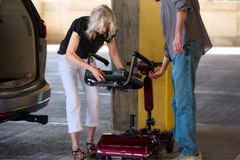
Practical add-ons can make daily use easier — from storage baskets and cup holders to a portable ramp for loading the scooter into a car.
Popular add-ons:
- Storage Solutions: Baskets and bags for everyday essentials.
- Comfort Accessories: Cushions and supportive seating options.
Step 5: Personalize the Appearance
Make It Yours
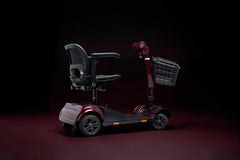
The Journey Lite comes in four color options, so you can choose the look that suits your style. Personalizing the color is a simple way to make the scooter feel like your own.
Color choices:
- Journey Lite: Available in orange, blue, red, and gray.
Step 6: Test and Adjust
Ensuring the Perfect Fit
After setting up your scooter, take it for a test ride in a familiar, open space to ensure everything feels comfortable and functional. Make any small adjustments to achieve the perfect fit.
Getting started:
- Initial Test Ride: Practice starting, stopping, and turning at low speed.
- Final Adjustments: Fine-tune the tiller and seat for comfort.
Conclusion
Setting up your Onward Mobility scooter is a straightforward process that ensures it meets your unique needs. By following these steps, you can enjoy a scooter that offers comfort, functionality, and personal style. Enjoy your journey with Onward Mobility!
Ready to make one yours? The Journey Lite comes in four colors and folds in seconds, while the Journey adds a touchscreen display and keyless start. Browse all mobility scooters → — free US shipping and a 90-day money-back guarantee.